

Best Vector Database 2026: Pinecone vs Qdrant vs Weaviate vs pgvector


Compare Pinecone, Qdrant, Weaviate and pgvector for 2026 RAG: deployment, hybrid search, filtering, operations and pricing checks.
Best Vector Database 2026: Pinecone vs Qdrant vs Weaviate vs pgvector
The vector database market offers managed services, open-source engines, and PostgreSQL extensions, and no reliable public dataset establishes one definitive production market-share ranking. This vector database 2026 comparison focuses on four widely evaluated options for RAG and embedding search: Pinecone, Qdrant, Weaviate, and pgvector. Each represents a distinct philosophy — fully managed serverless, OSS-first with a managed tier, hybrid retrieval as a first-class feature, or "just use the database you already have." This guide walks through what each is good at in 2026, where the costs land, and which one fits which workload.
The four products at a glance
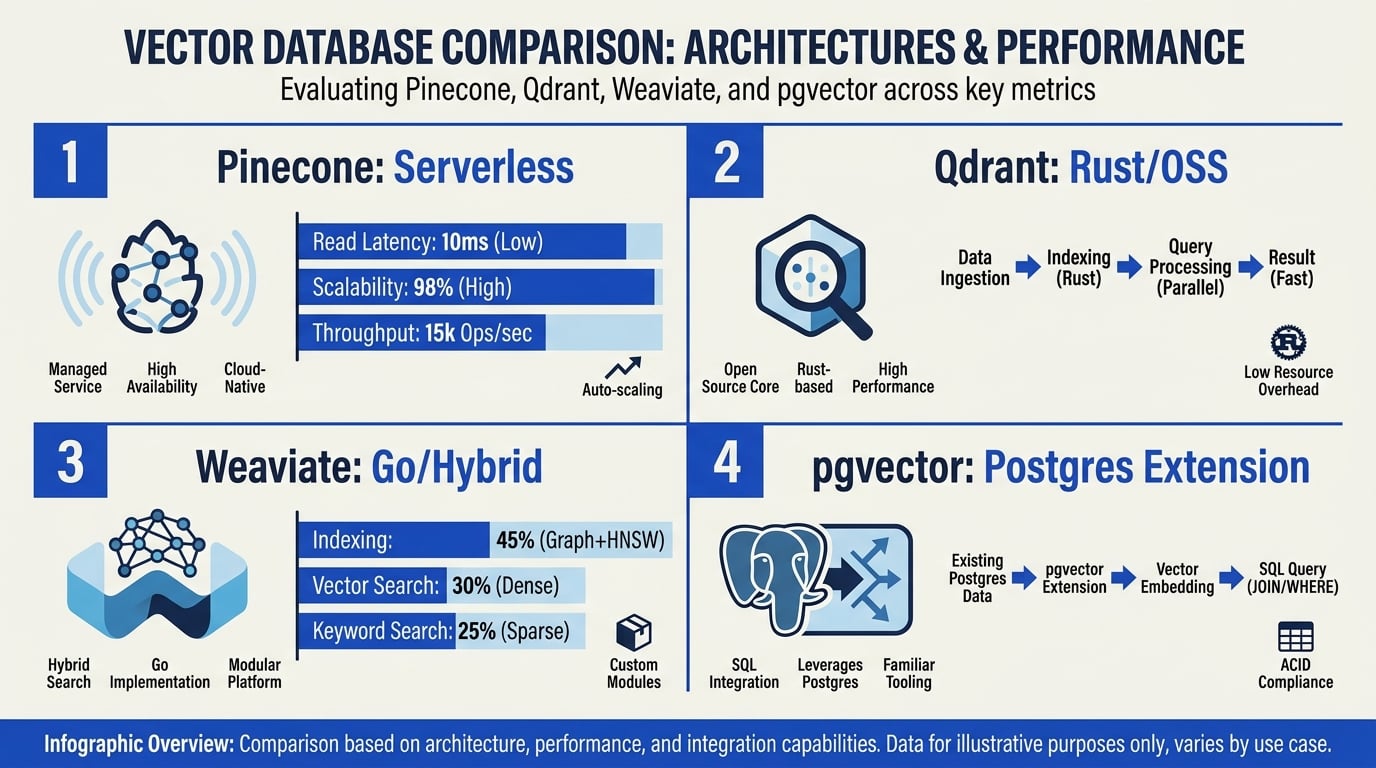
The short answer to “best vector database 2026” is: choose pgvector if your team already runs PostgreSQL and expects modest-to-medium vector workloads; Pinecone for the lowest operational burden; Qdrant for open-source control and sophisticated filtering; or Weaviate for configurable hybrid lexical and semantic search.
These are starting recommendations, not universal rankings:
- Pinecone — a fully managed, serverless-first service for teams that do not want to operate vector infrastructure. It provides dense and sparse retrieval, metadata filtering, and managed scaling, but no self-hosted edition.
- Qdrant — a Rust-based, open-source vector database available for self-hosting or through Qdrant Cloud. Its strengths include dense, sparse, and multi-stage retrieval plus detailed, indexable payload filtering.
- Weaviate — an open-source database written in Go, with self-hosted and managed options. Built-in BM25 and vector retrieval, adjustable weighting, and fusion controls make it a strong choice for applications where hybrid-search behavior needs tuning.
- pgvector — a PostgreSQL extension that stores vectors alongside relational data and supports exact search plus HNSW and IVFFlat indexes. PostgreSQL full-text search can supply the lexical side of hybrid retrieval, although teams generally need to implement ranking fusion in SQL or application code.
| Product | Deployment | Operations burden | Hybrid search | Filtering | Best fit |
|---|---|---|---|---|---|
| Pinecone | Managed cloud; serverless-first | Lowest: infrastructure, scaling, and availability are service-managed | Dense and sparse retrieval, with managed components for retrieval pipelines | Metadata filters integrated into vector queries | Teams prioritizing minimal operations and elastic managed infrastructure |
| Qdrant | Open-source self-hosting or Qdrant Cloud | Medium when self-hosted; lower on Cloud | Dense, sparse, multi-vector, and multi-stage queries with fusion and reranking options | Typed payload filters, nested conditions, and payload indexes | Teams wanting open-source deployment control and advanced filtering |
| Weaviate | Open-source self-hosting or Weaviate Cloud | Medium when self-hosted; lower on Cloud | Built-in BM25 and vector hybrid search with configurable weighting and fusion | Structured filters over object properties | Search applications that need tunable lexical-semantic retrieval |
| pgvector | Extension for self-managed or supported managed PostgreSQL | Low for teams already operating Postgres; rises with workload complexity | Vector and PostgreSQL full-text results can be combined in SQL or application code | SQL predicates, joins, permissions, and relational constraints | Postgres-first products with modest-to-medium vector workloads |
A practical selection guide:
| Team profile | Recommended starting point | Why | Main trade-off to validate |
|---|---|---|---|
| Postgres-first SaaS team | pgvector | Reuses existing schemas, transactions, access controls, backups, and SQL expertise | Measure the effect of vector indexing and queries on transactional traffic; consider workload isolation as usage grows |
| Team seeking the least infrastructure work | Pinecone | Removes most index-cluster provisioning, scaling, and availability work | Validate cost, service limits, regional availability, portability, and retrieval quality with production-like traffic |
| Self-hosted or regulated team | Qdrant | Offers open-source deployment flexibility and granular payload filtering | Confirm backup, restore, upgrades, security controls, observability, and internal operating capacity |
| Hybrid-search product team | Weaviate | Provides built-in BM25-vector hybrid search with adjustable weighting and fusion | Tune lexical-versus-vector weighting against a labeled relevance set rather than relying on defaults |
| Managed team comparing retrieval behavior | Pinecone, Qdrant Cloud, or Weaviate Cloud | Each offers a managed path with different retrieval primitives and operational abstractions | Compare relevance, filtered-query latency, ingestion performance, scaling behavior, and total cost |
Dataset size alone does not determine the winner. A large, lightly filtered dataset may be easier to serve than a smaller dataset with selective filters, frequent updates, strict recall targets, high concurrency, or large vectors. Existing infrastructure also matters: pgvector can be the simplest option for a Postgres team, while the same workload may justify a dedicated service if it threatens transactional performance.
A credible best vector database 2026 evaluation should use representative documents, queries, filters, and update patterns. Measure recall or relevance alongside tail latency, ingestion speed, operational effort, failure recovery, and steady-state cost. The best choice is the product that meets those requirements under production-like conditions—not the one that wins a synthetic benchmark in isolation.
Pricing snapshot (mid-2026)
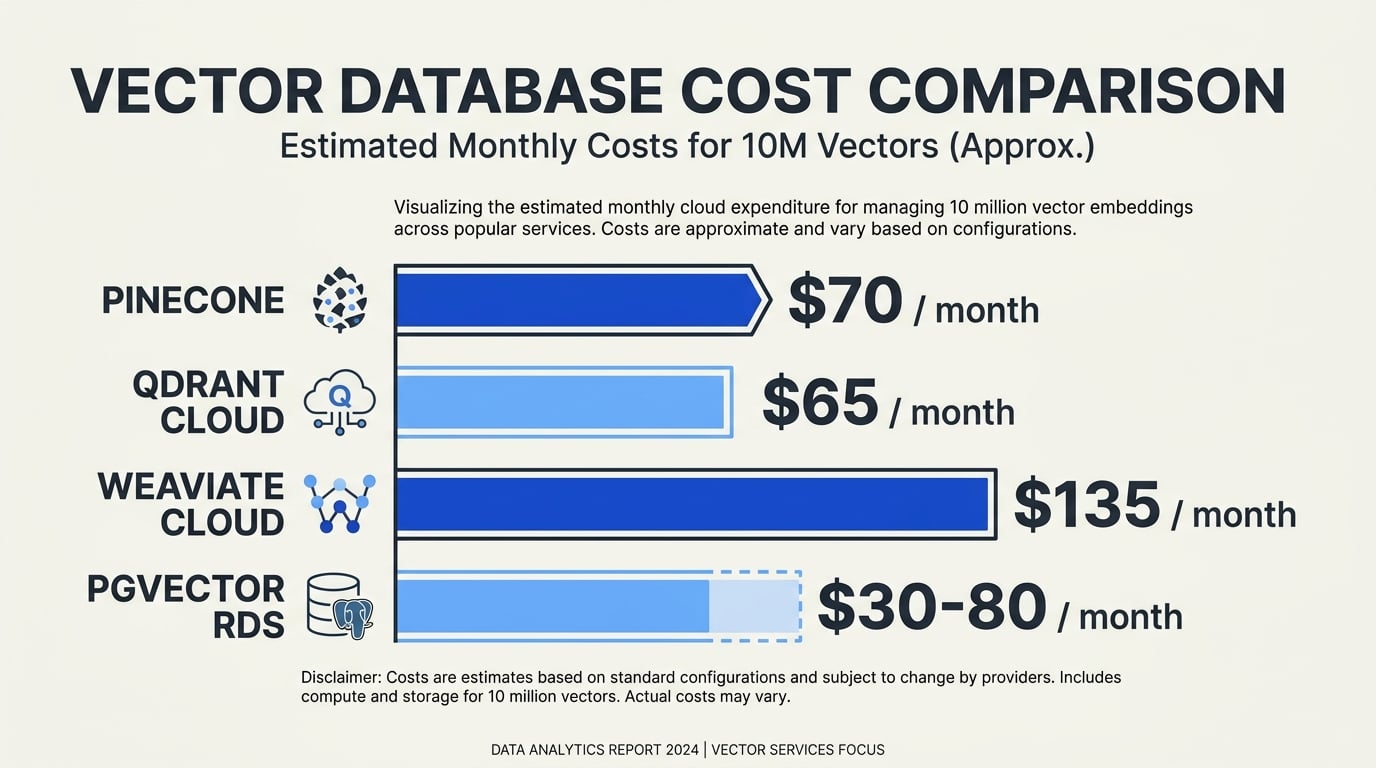
As of July 2026, these products use materially different billing models. Pinecone primarily meters serverless usage, Qdrant Cloud prices managed cluster capacity, Weaviate Cloud combines service-plan and resource or usage pricing, and pgvector inherits the cost model of the PostgreSQL deployment that runs it. A credible vector database 2026 comparison therefore cannot reduce them to one universal price per vector.
Estimated monthly cost = storage + queries/compute + writes/imports + replicas + backups + network transfer + support + engineering labor
Free plans are useful for evaluation but should not be treated as production cost estimates. Limits, included allowances, regional availability, service-level commitments, and rates can change. Verify the applicable region and configuration on each vendor’s official pricing page before purchasing.
| Product | Free or evaluation option | Production billing model | Costs to include in a proof of concept |
|---|---|---|---|
| Pinecone Serverless | Pinecone’s Starter plan provides a limited free allowance for development and evaluation. It has lower limits and fewer production features than paid plans. | Serverless pricing meters stored data and read/write activity, with plan-specific minimums, allowances, support, and features. Read consumption depends on the work performed rather than query count alone. See Pinecone pricing and its cost documentation. | Import a representative dataset and record storage, read units, write units, query rate, update volume, deletion behavior, top-k, filter selectivity, namespaces, backups, region, and egress. Include any paid-plan minimum rather than pricing only the measured usage. |
| Qdrant Cloud | Qdrant Cloud offers a small free cluster subject to current resource and feature limits. It is suitable for testing, not for estimating a replicated production deployment. The open-source server can also be self-hosted without a Qdrant software license fee. | Paid Qdrant Cloud deployments are managed clusters sized by resources such as CPU, RAM, storage, node count, replication, and cloud region. Larger or replicated configurations reserve capacity even when traffic is low. See Qdrant pricing and Cloud pricing documentation. | Measure memory and disk use after vector and payload indexes are built. Price the required node topology, replicas, snapshots, backup retention, restore procedures, egress, support, and the next scaling step. For self-hosting, add infrastructure and operations labor separately. |
| Weaviate Cloud | Weaviate may provide a free, trial, or time-limited Sandbox option under its current terms. Treat it as an evaluation environment and confirm its expiration, capacity, backup, and availability restrictions. The open-source database can be self-hosted. | Weaviate Cloud pricing depends on the selected service tier and current resource or usage measures, including stored vector dimensions or allocated capacity where applicable. Production features, support, availability commitments, and dedicated configurations can change the quote. See Weaviate pricing and Cloud documentation. | Supply object count, vectors per object, dimensions, metadata, replication factor, tenancy model, import and query rates, hybrid-search use, and growth. Price vectorization, reranking, or generative-model APIs separately when those services are not included. |
| pgvector | pgvector is an open-source PostgreSQL extension; there is no separate pgvector license charge for ordinary self-hosting. Free PostgreSQL service tiers, when offered by cloud providers, have provider-specific limits. | The bill comes from PostgreSQL infrastructure: instance or cluster size, CPU, RAM, block storage, IOPS, WAL, replicas, backups, network transfer, and managed-service fees. Pricing therefore depends on the chosen provider and region, not on a universal pgvector rate. | Test on the intended PostgreSQL version, provider, instance class, storage type, and index configuration. Measure table and index size, cache hit rate, query plans, recall and latency, index-build time, WAL growth, autovacuum load, replica lag, backup/restore time, and effects on existing SQL workloads. |
Normalized cost checklist
Use the same inputs for every vector database 2026 quote, even though vendors translate those inputs into different billing units:
| Cost category | Inputs to normalize |
|---|---|
| Stored dataset | Number of objects; vectors per object; dimensions; numeric type; metadata or payload bytes; expected index overhead; deleted-record cleanup; monthly growth |
| Traffic | Queries per second and per month; peak-to-average ratio; top-k; filter selectivity; hybrid-search frequency; batch size; monthly imports, upserts, and deletes |
| Performance | Target p50 and p95 latency; recall target; concurrency; index type and parameters; warm-cache and cold-cache behavior |
| Availability | Number of replicas or nodes; zones and regions; failover target; maintenance requirements; read scaling |
| Data protection | Snapshot frequency; backup retention; point-in-time recovery; restore testing; backup copies and locations |
| Network | Client region; cross-zone and cross-region traffic; internet egress; import/export volume; replication traffic |
| Commercial terms | Free allowance; minimum monthly spend; annual commitment; support plan; SLA; overage rates; taxes and discounts |
| Operations | Monitoring, upgrades, patching, incident response, security reviews, capacity planning, backup testing, and performance tuning |
Raw embedding size is only a starting point:
vector count × vectors per object × dimensions × bytes per dimension
The physical footprint can be materially larger after metadata, vector indexes, payload or inverted indexes, database pages, replication, snapshots, and retained deleted data are included. Conversely, compression or quantization can reduce some storage and memory requirements, but may introduce additional build time, compute, or recall trade-offs that should be tested rather than assumed.
Billing units also are not interchangeable. Pinecone read and write units represent metered service work; Qdrant cluster resources represent provisioned capacity; Weaviate charges follow its current cloud tier and resource or usage definitions; pgvector consumes PostgreSQL compute, memory, storage, and I/O. A nominal “one million queries” comparison is misleading unless each system runs the same dataset, filters, top-k, concurrency, recall target, and availability configuration.
For self-hosted Qdrant, Weaviate, or pgvector, include the full infrastructure configuration and an internal monthly labor estimate. An inexpensive single-node server is not equivalent to a managed, monitored, replicated service with tested backups. Conversely, a managed service’s higher invoice may produce a lower total cost if it removes enough database administration and incident-response work.
For the final vector database 2026 decision, run a production-like workload for at least one representative billing cycle where practical. Request an itemized expected-case quote and a growth-case quote that adds higher traffic, another replica, longer backup retention, and cross-region transfer. Prices, free-tier limits, included features, and regional availability vary by configuration and may change after July 2026, so confirm all figures directly with Pinecone, Qdrant, Weaviate, or the selected PostgreSQL provider before purchase.
Performance: where each one shines
[Inference] Below is the texture of public benchmarks rather than a single authoritative number; numbers swing with index settings and dimensionality.
- Pinecone — consistent low-millisecond query latency at any scale because the index is partitioned and replicated for you. The trade is opacity — you do not see the index parameters, and you cannot tune them.
- Qdrant — extremely fast on HNSW with payload filtering, and its Rust core is memory-efficient. Strong at hybrid filtering ("vectors where tenant_id = X").
- Weaviate — competitive raw speed; its standout is hybrid search built into the query language. BM25 + dense fusion with re-ranking is a one-line query, not a service to assemble.
- pgvector — slower than dedicated engines at very large scale, but for under ~10M vectors with HNSW it is fast enough and you get joins, transactions, and RBAC for free.
Hybrid search
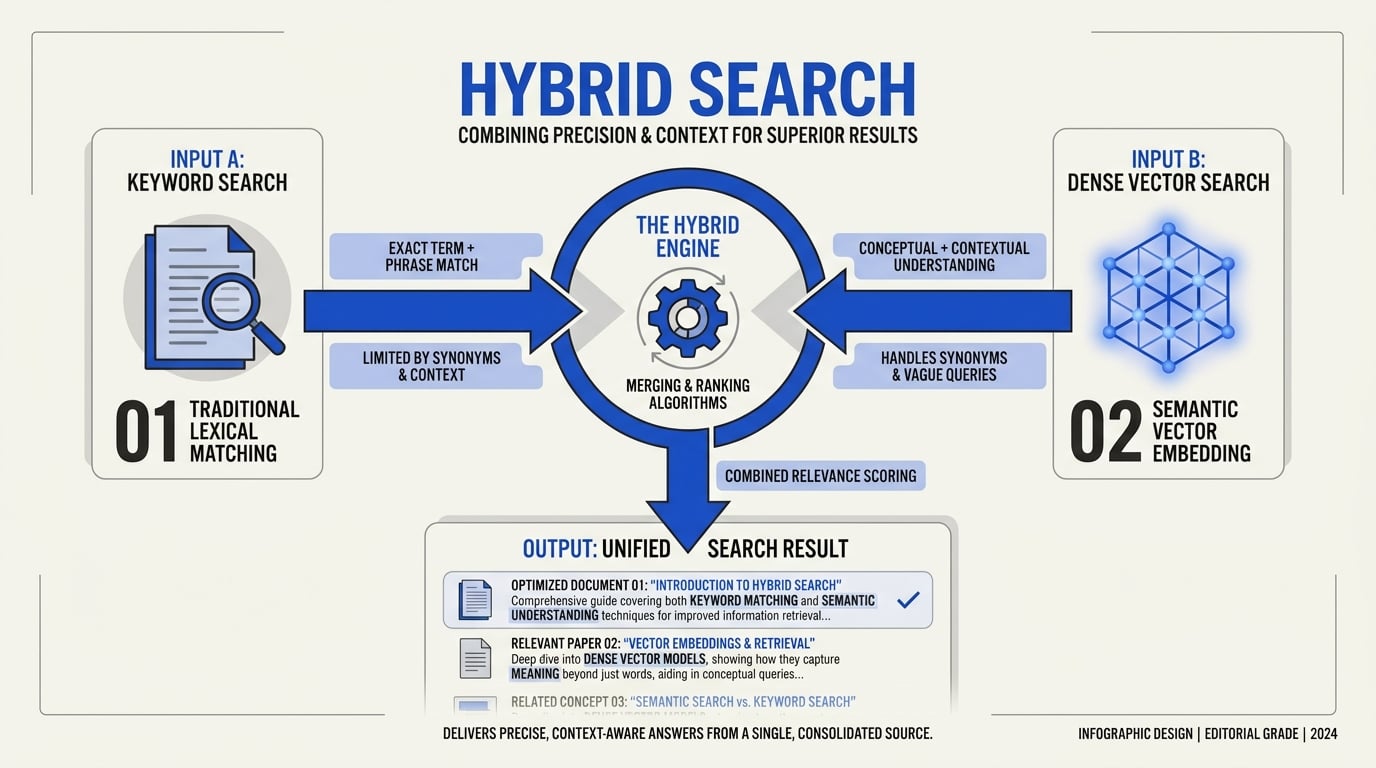
In 2026 hybrid (lexical + dense) is no longer optional for production RAG. Lexical-only misses semantic matches; dense-only misses keyword-exact matches like product SKUs.
- Weaviate — hybrid is native, with a single
hybridquery operator and a configurable alpha. - Qdrant — supports sparse vectors (BM25-style) and dense in the same collection, fused at query time. The setup is more manual than Weaviate but the runtime is just as fast.
- Pinecone — supports hybrid via sparse-dense vector pairs; clean API, slightly higher cost per query.
- pgvector — combine
vectorsimilarity with Postgres full-text search (tsvector); you write the fusion yourself, but you are also one SQL query away from the answer.
When each one fits

Treat any vector database 2026 shortlist as a starting point, not a final answer. Test candidates with your own corpus, embedding model, metadata filters, tenant distribution, query mix, and latency targets. Public benchmarks rarely reproduce the filtering, concurrency, and relevance tradeoffs of a production RAG application.
Early-stage RAG when the data already lives in Postgres
Recommended starting point: pgvector.
pgvector is often the shortest path from prototype to useful retrieval when documents, permissions, and application records already live in Postgres. It keeps relational joins, transactions, backups, and access controls in a system the team already operates.
Benchmark before committing: Compare exact search with HNSW or IVFFlat indexes using production-like row counts. Measure recall, filtered-query latency, index build time, memory use, and the effect of concurrent vector searches on transactional queries.
Caution: This advantage can diminish as vector volume, ingestion, or query concurrency grows. Keep vector-heavy workloads from degrading the primary transactional database, potentially by using replicas or a separate Postgres instance.
Managed production with a small operations team
Recommended starting point: Pinecone.
Pinecone fits teams that want a managed service and would rather spend engineering time on retrieval quality than cluster deployment, scaling, upgrades, and recovery. It is especially attractive when predictable operations matter more than infrastructure portability.
Benchmark before committing: Replay realistic traffic with metadata filters and production top-k values. Measure p50, p95, and p99 latency, ingestion throughput, recall, and projected monthly cost at expected vector count and request volume.
Caution: Model cost with real usage rather than headline prices. Storage, writes, reads, replicas, and workload peaks can change the comparison, while a managed platform also creates switching and data-migration considerations.
Self-hosted or privacy-sensitive deployments
Recommended starting point: Qdrant.
Qdrant is a strong option when data must remain in a private cloud, on-premises environment, or tightly controlled network. Its open-source distribution supports self-hosting, while its managed offering leaves room to change the operating model later.
Benchmark before committing: Deploy on the hardware and storage class you expect to use. Test filtered search, index construction, memory pressure, ingestion during live queries, node recovery, backups, and performance after a restart or failure.
Caution: Self-hosting transfers responsibility for capacity planning, upgrades, monitoring, replication, and disaster recovery to your team. Include engineering and infrastructure overhead in the cost comparison.
Hybrid keyword and vector retrieval
Recommended starting point: Weaviate.
Weaviate is a natural candidate when semantic similarity must be combined with keyword relevance, metadata filters, reranking, or generative-search workflows. Keeping these retrieval capabilities close to the database can simplify an architecture that would otherwise coordinate several services.
Benchmark before committing: Build a labeled evaluation set from real user questions. Compare vector-only, keyword-only, and hybrid retrieval using recall@k, nDCG, or MRR, then measure end-to-end latency with filters and reranking enabled.
Caution: A broad feature set is not automatically better. If simple nearest-neighbor search is sufficient, confirm that the additional concepts and operational surface deliver measurable relevance gains.
Multi-tenant SaaS
Recommended starting point: Weaviate when explicit tenant separation and hybrid retrieval are central; Pinecone when minimizing operations is the priority. Qdrant is also worth evaluating when deployment control matters.
The main design question is not only vector count but tenant shape. Thousands of small tenants, a few very large tenants, uneven traffic, per-tenant deletion, and tenant-specific filters can produce very different results.
Benchmark before committing: Reproduce the expected tenant distribution and noisy-neighbor conditions. Test tenant-scoped p95 latency, authorization filters, onboarding and deletion time, idle-tenant overhead, hot-tenant bursts, backup and restore behavior, and cost per active tenant.
Caution: Do not assume that a namespace, collection, partition, or tenant feature provides every isolation property your application requires. Validate access control, resource isolation, deletion guarantees, and operational limits separately.
Very large datasets
Recommended starting point: Pinecone for a managed-first approach; Qdrant for teams prepared to self-host and tune infrastructure. Weaviate should remain on the shortlist when hybrid retrieval is a core requirement.
At large scale, the winner depends on more than the advertised maximum vector count. Vector dimensions, compression, metadata size, filter selectivity, update rate, replicas, index settings, and recall targets all affect capacity and cost.
Benchmark before committing: Run a representative subset large enough to expose scaling behavior, then project cautiously. Measure recall versus latency, filtered-search performance, ingestion and reindexing time, storage and memory per million vectors, failure recovery, and total cost at expected peak traffic.
Caution: A fast unfiltered nearest-neighbor demo is not a production benchmark. Large datasets often reveal bottlenecks in metadata filtering, rebalancing, backups, and index maintenance before raw vector search becomes the limiting factor.
Decision table
| Scenario | Recommended starting point | Benchmark to run before committing |
|---|---|---|
| Early-stage RAG with source data in Postgres | pgvector | Recall and p95 latency with real joins, permission filters, and concurrent transactional traffic |
| Managed production with a small ops team | Pinecone | Production-like query replay covering filters, ingestion, tail latency, and monthly cost |
| Self-hosted or privacy-sensitive deployment | Qdrant | Search and ingestion on target hardware, including recovery, backups, and memory pressure |
| Hybrid keyword and vector retrieval | Weaviate | Keyword-only versus vector-only versus hybrid relevance on a labeled corpus |
| Multi-tenant SaaS | Weaviate or Pinecone, depending on isolation and ops priorities | Noisy-neighbor, tenant deletion, authorization-filter, and cost-per-tenant tests |
| Very large dataset | Pinecone for managed operations; Qdrant for infrastructure control | Recall, filtered latency, storage, reindexing, recovery, and total cost at projected scale |
The best vector database is the one that meets your relevance, latency, isolation, operability, and cost requirements on your own data. Before committing, use the same embeddings, document lengths, metadata filters, tenant patterns, update rates, and difficult queries that the production system will face.
Things to verify before committing
- Define acceptance criteria — document target recall, p50/p95/p99 latency, query throughput, ingestion rate, availability, recovery objectives, and budget before comparing products. A vector database should be evaluated against these requirements, not a vendor’s default demo.
- Use a representative corpus — load production-like embeddings, metadata, document sizes, tenant distributions, and query patterns. Test enough data to expose memory, storage, and index-build constraints; a small synthetic dataset rarely predicts how a vector database will behave in production.
- Compare index configurations — benchmark HNSW, IVF-based indexes, quantization, and exact search where supported. Use exact results as a recall baseline, then tune each vector database fairly because index parameters trade recall, latency, memory, and build time differently.
- Measure recall and latency at target concurrency — report recall@k alongside p50, p95, and p99 latency while increasing concurrent queries. Include cold starts, cache-warm runs, and mixed read/write traffic so the vector database is tested under realistic load rather than single-query conditions.
- Test filtering selectivity — run unfiltered queries and filters that match broad, medium, and very narrow portions of the corpus. Verify how the vector database combines metadata filtering with ANN search, and watch for reduced recall, over-fetching, or latency spikes at low selectivity.
- Evaluate hybrid-search quality — use judged queries to compare dense-only, sparse or BM25-style, and fused retrieval. Measure relevance with metrics such as nDCG@k, MRR, or recall@k, and confirm whether the vector database provides explainable weighting, reranking hooks, and configurable fusion.
- Benchmark ingestion and updates — measure initial bulk load, sustained upserts, deletes, metadata changes, and index-build or compaction effects. Confirm when new records become searchable and whether heavy writes degrade vector database query latency or require operational throttling.
- Validate multitenancy — test the intended isolation model, including separate indexes, namespaces, collections, partitions, or row-level filters. Check authorization boundaries, per-tenant quotas, noisy-neighbor behavior, and the operational cost of adding or removing tenants from the vector database.
- Prove backup and recovery — identify what is backed up, how often, and whether indexes can be restored without re-embedding the source corpus. Perform a timed restore and validate consistency against stated RPO and RTO targets; managed offerings still require configuration, testing, and a clear shared-responsibility model.
- Confirm regions and compliance — verify that storage, replicas, backups, logs, and support access remain in approved locations. Review encryption, key-management options, audit logs, identity integration, retention controls, subprocessors, certifications, and required contractual terms.
- Model the full cost — include compute, memory, storage, replicas, backups, read/write units, support, observability, private networking, and data egress. Price both normal traffic and growth scenarios, including cross-region replication and exporting the complete dataset.
- Account for staffing and exit costs — estimate engineering time for tuning, upgrades, incident response, capacity planning, and security reviews. Before signing, test export and migration of vectors, IDs, metadata, sparse representations, and source references; document proprietary APIs or features that would need replacement, and retain the original data and embedding pipeline so indexes can be rebuilt elsewhere.
Bottom line
There is no single best vector database in 2026 for every workload. The practical verdict is:
- Best overall for most new projects: Qdrant. It offers a strong balance of retrieval performance, filtering, developer experience, deployment flexibility, and operational control.
- Best when Postgres is already your system of record: pgvector. It keeps vectors, metadata, transactions, and application data together, reducing architectural complexity—especially at modest scale.
- Best for fully managed, low-operations deployments: Pinecone. Choose it when rapid production rollout and minimal infrastructure management matter more than avoiding platform premiums or vendor dependence.
- Best for hybrid search: Weaviate. It is a strong fit when combining semantic and keyword retrieval is central to the product rather than an occasional feature.
Do not choose from feature tables alone. Run a proof of concept using your real embeddings, metadata, filters, query patterns, and expected corpus size. Compare these four metrics:
- Recall/quality on representative queries
- p95 latency under filtering and realistic concurrency
- Ingestion/update speed, including deletes and re-indexing
- Total monthly operating cost, including infrastructure, support, and engineering time
Treat migration risk as a first-class concern. Index configuration, metadata schemas, filtering behavior, hybrid-ranking semantics, and client APIs do not transfer perfectly between systems. Keep an abstraction layer around retrieval, retain source documents and embeddings outside the database, and test export and rebuild procedures early. The wrong choice may not kill the project, but avoidable lock-in can make correcting it expensive.
Frequently Asked Questions
What is the best overall vector database in 2026?
Is pgvector fast enough for production RAG at scale?
Should I choose Pinecone or Qdrant?
Is Weaviate the best option for hybrid search?
How difficult is it to migrate between vector databases?
How should I benchmark vector databases?
Which option costs the least?
Related Posts
Ready to automate customer conversations?
Launch AI voice agents and WhatsApp bots with CallMissed — one API, 22+ Indian languages.